Many Thai e-Visa applications get rejected before they’re ever reviewed – not because of missing documents or eligibility issues, but because of a photo that doesn’t meet the official requirements.
A blurry image, the wrong background color, or a file that’s too large can delay your travel plans by days. And if you’re applying close to your departure date, that’s time you don’t have to waste.
The good news is that getting your photo right is straightforward once you know the exact specifications. This guide covers everything you need to know, based on the official Thai e-Visa photo requirements published by Royal Thai Embassy.
What Is the Thai e-Visa?
The Thai e-Visa is an online visa application system that allows eligible travelers to apply for permission to enter Thailand without visiting an embassy in person. It covers several visa categories, including tourist visas, non-immigrant visas, and transit visas.
Who Needs to Apply Online?
Nationals from eligible countries can submit their application, supporting documents, and visa fee entirely online through the official Thai e-Visa portal. The system was introduced to make the process faster and more accessible for international travelers.
Why Photo Quality Matters for Approval
Your photo is one of the first things visa officers review. If it doesn’t meet the required specifications, your application will be flagged for rejection — even if every other document is perfect. Unlike paper applications where you can resubmit quickly, errors in an online application may require you to start the process again.
Getting the photo right the first time saves you time, money, and stress.
Official Thai e-Visa Photo Specifications
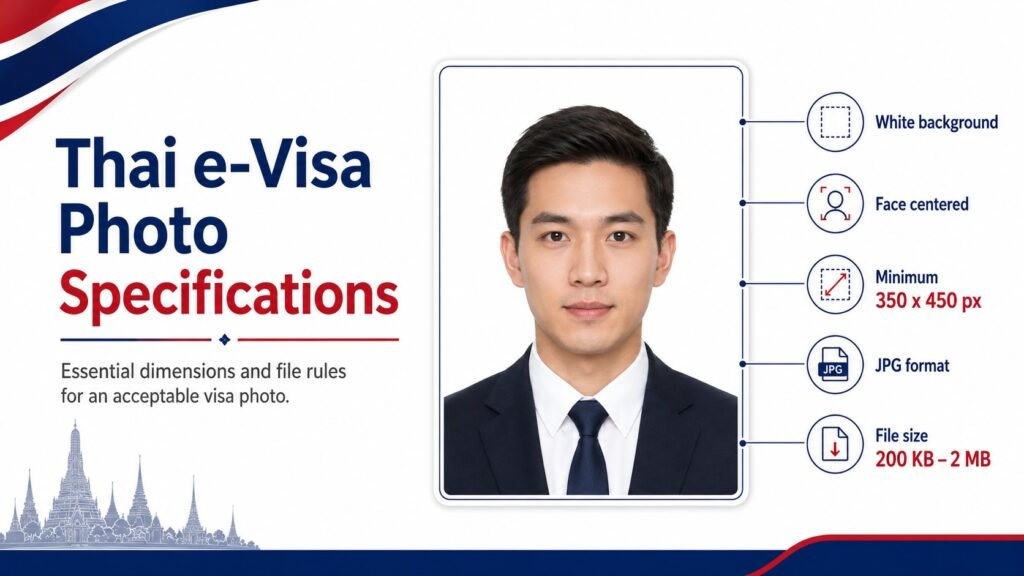
Quick Reference: A Thai e-Visa photo must be in JPG or JPEG format, sized between 200 KB and 2 MB, with dimensions of at least 350 x 450 pixels, shot against a plain white background, and showing a clear, front-facing view of the applicant’s full face.
Here is a full breakdown of the required specifications:
| Specification | Requirement |
|---|---|
| File Format | JPG / JPEG only |
| Minimum Dimensions | 350 x 450 pixels (width x height) |
| Recommended Dimensions | 600 x 800 pixels or higher |
| File Size | Between 200 KB and 2 MB |
| Resolution | Minimum 300 DPI recommended |
| Background Color | Plain white only |
| Face Coverage | 70–80% of the frame |
| Photo Age | Taken within the last 6 months |
Required Photo Dimensions
Your photo must be at least 350 x 450 pixels (width x height). Royal Thai Embassy recommends submitting a higher resolution image — ideally 600 x 800 pixels — to ensure the image is sharp and clear when reviewed by immigration officers.
Do not submit a cropped screenshot or a photo scanned at low resolution. These commonly fail the automated image check.
Accepted File Formats
Only JPG or JPEG files are accepted. PNG, PDF, HEIC, and other formats will be rejected by the system. If your phone saves photos in HEIC format (common on iPhones), you will need to convert the file before uploading.
Maximum and Minimum File Size
The photo file must be between 200 KB and 2 MB. Files smaller than 200 KB are often low quality and will be rejected. Files larger than 2 MB will not upload successfully on the portal.
If your photo is too large, use a free image compression tool to reduce the file size without significantly lowering quality.
Resolution Requirements
A minimum of 300 DPI is recommended for a clear, printable-quality image. Photos taken on a modern smartphone in good lighting typically meet this standard automatically.
Photo Composition Guidelines
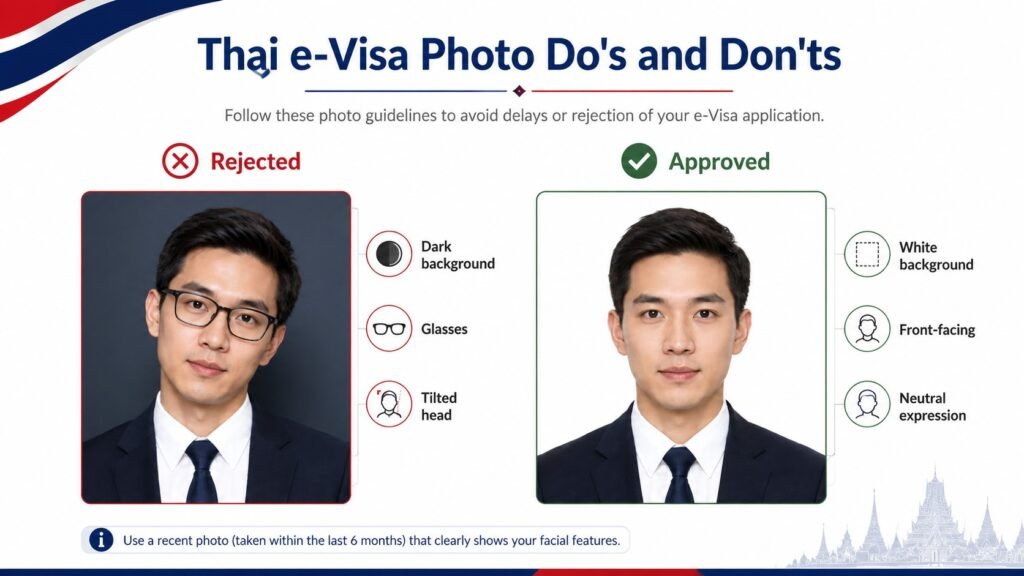
The technical specifications are only part of the picture. The composition — how your face appears in the photo — is equally important.
Background Color Requirements
The background must be plain white. No patterns, textures, gradients, or off-white shades are acceptable. Gray, cream, or light blue backgrounds that look white on-screen may still be rejected.
If you are taking the photo at home, stand against a white wall in a well-lit room. Avoid casting shadows on the background.
Facial Expression and Head Position
- Look directly into the camera with both eyes fully open
- Keep a neutral expression — no smiling with teeth, no frowning
- Your head must be straight, not tilted to either side
- Both ears should be visible
- Your full face from chin to the top of your head must be in the frame
Lighting and Shadow Rules
- Use even, natural lighting — avoid harsh flash that washes out your face
- There should be no shadows on your face or the background
- Avoid backlighting (do not stand in front of a window)
Glasses, Headwear, and Accessories
- Glasses are not permitted in Thai e-Visa photos, in line with ICAO biometric photo standards
- Headwear is not permitted unless worn for documented religious reasons
- Hair should not cover the face or obscure the facial features
- No heavy filters or editing — the photo must be a true representation of your appearance
How to Take or Prepare a Compliant Thai e-Visa Photo
Taking the Photo at Home
You can take a compliant photo at home with a smartphone. Follow these steps:
- Find a plain white wall with good natural light
- Position yourself 1–2 feet from the wall to avoid background shadows
- Ask someone to hold the phone at eye level, or use a tripod
- Wear everyday clothing — avoid white tops that blend into the background
- Remove glasses and any non-religious headwear
- Take several shots and choose the clearest, most evenly lit one
- Check that your face fills 70–80% of the frame before uploading
Using a Professional Photographer
Many passport photo services are familiar with e-Visa requirements. Ask specifically for a digital passport-style photo on a white background in JPG format. Confirm they can provide the file digitally at the required resolution and file size.
Online Tools to Resize and Format Your Photo
If your photo doesn’t quite meet the size or format requirements, several free online tools can help:
- Compress the file size: Tools like Squoosh or TinyJPG can reduce file size without major quality loss
- Resize dimensions: Use Adobe Express, Canva, or a simple photo editor to adjust pixel dimensions
- Convert HEIC to JPG: Use iLoveIMG or your phone’s built-in export settings
Always double-check the final file before uploading — confirm the format, size, and dimensions are within the accepted range.
Common Photo Mistakes That Lead to Rejection
These are the most frequent reasons Thai e-Visa photos are rejected, based on guidance from Royal Thai Embassy:
Incorrect File Size or Dimensions
Uploading a photo under 200 KB or over 2 MB will cause an immediate upload failure. Similarly, photos significantly smaller than 350 x 450 pixels may be rejected for poor quality.
Fix: Check your file size and dimensions before uploading. Most computers show this information when you right-click the file and view its properties.
Poor Lighting or Blurry Image
A dark, shadowy, or out-of-focus photo will be rejected. This is one of the most common issues with self-taken photos.
Fix: Take the photo in a bright room near a window, but avoid direct sunlight. Use the rear camera on your phone rather than the front-facing camera, which typically has lower resolution.
Non-White Background
A cream, light gray, or patterned background — even one that looks white on your phone screen — will fail the review.
Fix: Use a pure white background only. If needed, some photo editing tools allow background removal and replacement with a white fill, but the result must look natural.
Wearing Glasses or Unauthorized Headwear
This is a straightforward reason for rejection that is easy to avoid.
Fix: Remove glasses before taking your photo. If you wear headwear for religious reasons, check the official Thai e-Visa portal for the documentation required to support this.
Step-by-Step: Uploading Your Photo to the Thai e-Visa Portal
Where to Upload
When completing your Thai e-Visa application at the official Thai e-Visa portal (royalthaiembassy.com), you will reach a section that asks you to upload your personal photo. This is separate from the document upload section.
Click the upload button, locate your photo file on your device, and select it. The system will run an automated check on the file format and size before accepting it.
What Happens After Submission
Once your photo passes the initial system check, it will be reviewed by a visa officer alongside your other documents. If there is a problem with the photo that was not caught automatically, you may receive a request to resubmit. Check your email regularly after submitting your application.
For guidance on starting your application, visit https://royalthaiembassy.com/.
Frequently Asked Questions
What file format is accepted for a Thai e-Visa photo? Only JPG or JPEG files are accepted. PNG, PDF, HEIC, and other formats will be rejected. If your phone saves images in HEIC format, convert the file to JPG before uploading.
What background color is required for a Thai e-Visa photo? The background must be plain white. No patterns, off-white shades, or colored backgrounds are accepted. Gray and cream backgrounds are frequently rejected even when they appear white on-screen.
Can I wear glasses in my Thai e-Visa photo? No. Glasses are not permitted in Thai e-Visa photos, in line with international biometric photo standards. Remove glasses before taking your photo.
How do I reduce my photo file size for the Thai e-Visa upload? Use a free online image compression tool such as Squoosh, TinyJPG, or iLoveIMG. These tools reduce file size without major quality loss. Your final file must be between 200 KB and 2 MB.
What should I do if my Thai e-Visa photo is rejected? If your photo is rejected, review the specific reason provided by the portal or in the rejection notification. Retake or reformat your photo to meet the stated requirements, then resubmit. If you are unsure, contact Royal Thai Embassy for clarification before reapplying.
Final Tips Before You Submit
Before you click submit on your Thai e-Visa application, run through this checklist:
- File format is JPG or JPEG
- File size is between 200 KB and 2 MB
- Dimensions are at least 350 x 450 pixels
- Background is plain white
- Face is centered and fills 70–80% of the frame
- Eyes are open and clearly visible
- No glasses, headwear, or heavy photo filters
- Photo was taken within the last 6 months
Taking two minutes to verify each of these points before submitting can save you days of delays.
Conclusion
A rejected photo is one of the easiest problems to avoid when applying for a Thai e-Visa and one of the most frustrating when it happens. By following the official photo specifications outlined in this guide, you can submit your application with confidence.
For the most up-to-date requirements and to begin your application, visit https://royalthaiembassy.com Royal Thai Embassy provides official guidance and support to help you navigate the Thai e-Visa process from start to finish.